Stopping and resuming crawlers
A crawler normally runs until its request queue is empty. This guide covers the cases where you want to change that: stopping the crawl early once you've found what you're looking for, keeping the crawler alive while it waits for more requests, and resuming an interrupted crawl from where it stopped.
All the options on this page are available to every crawler that inherits from BasicCrawler. The examples use BeautifulSoupCrawler, but they work the same with any other crawler.
Stopping a crawler
Call crawler.stop() to stop the crawler, for example once it finds what it's looking for. The crawler won't pick up any new requests, but requests that are already being processed concurrently are finished. The optional reason argument is a string that appears in the logs, which can improve their readability, especially when multiple conditions can trigger the stop.
import asyncio

from crawlee.crawlers import BeautifulSoupCrawler, BeautifulSoupCrawlingContext


async def main() -> None:
    # Create an instance of the BeautifulSoupCrawler class, a crawler that automatically
    # loads the URLs and parses their HTML using the BeautifulSoup library.
    crawler = BeautifulSoupCrawler()

    # Define the default request handler, which will be called for every request.
    # The handler receives a context parameter, providing various properties and
    # helper methods. Here are a few key ones we use for demonstration:
    # - request: an instance of the Request class containing details such as the URL
    #   being crawled and the HTTP method used.
    # - soup: the BeautifulSoup object containing the parsed HTML of the response.
    @crawler.router.default_handler
    async def request_handler(context: BeautifulSoupCrawlingContext) -> None:
        context.log.info(f'Processing {context.request.url} ...')

        # Create custom condition to stop crawler once it finds what it is looking for.
        if 'crawlee' in context.request.url:
            crawler.stop(
                reason='Manual stop of crawler after finding `crawlee` in the url.'
            )

        # Extract data from the page.
        data = {
            'url': context.request.url,
        }

        # Push the extracted data to the default dataset. In local configuration,
        # the data will be stored as JSON files in ./storage/datasets/default.
        await context.push_data(data)

    # Run the crawler with the initial list of URLs.
    await crawler.run(['https://crawlee.dev'])


if __name__ == '__main__':
    asyncio.run(main())
Keeping a crawler alive
To keep the crawler running even when there are no requests to process at the moment, pass keep_alive=True to the crawler's constructor (see BasicCrawlerOptions). The crawler then waits for more requests to be added instead of finishing. This setup is useful when another component adds requests over time, as in the Running in web server guide. A crawler started with keep_alive=True is stopped by calling crawler.stop().
import asyncio

from crawlee._types import BasicCrawlingContext
from crawlee.crawlers import BeautifulSoupCrawler


async def main() -> None:
    crawler = BeautifulSoupCrawler(
        # Keep the crawler alive even when there are no requests to be processed now.
        keep_alive=True,
    )

    def stop_crawler_if_url_visited(context: BasicCrawlingContext) -> None:
        """Stop crawler once specific url is visited.

        Example of guard condition to stop the crawler."""
        if context.request.url == 'https://crawlee.dev/docs/examples':
            crawler.stop(
                'Stop crawler that was in keep_alive state after specific url was visite'
            )
        else:
            context.log.info('keep_alive=True, waiting for more requests to come.')

    async def add_request_later(url: str, after_s: int) -> None:
        """Add requests to the queue after some time. Can be done by external code."""
        # Just an example of request being added to the crawler later,
        # when it is waiting due to `keep_alive=True`.
        await asyncio.sleep(after_s)
        await crawler.add_requests([url])

    # Define the default request handler, which will be called for every request.
    @crawler.router.default_handler
    async def request_handler(context: BasicCrawlingContext) -> None:
        context.log.info(f'Processing {context.request.url} ...')

        # Stop crawler if some guard condition has been met.
        stop_crawler_if_url_visited(context)

    # Start some tasks that will add some requests later to simulate real situation,
    # where requests are added later by external code.
    add_request_later_task1 = asyncio.create_task(
        add_request_later(url='https://crawlee.dev', after_s=1)
    )
    add_request_later_task2 = asyncio.create_task(
        add_request_later(url='https://crawlee.dev/docs/examples', after_s=5)
    )

    # Run the crawler without the initial list of requests.
    # Wait for more requests to be added to the queue later due to `keep_alive=True`.
    await crawler.run()

    await asyncio.gather(add_request_later_task1, add_request_later_task2)


if __name__ == '__main__':
    asyncio.run(main())
Resuming a paused crawl
When a local crawler run is interrupted - say with CTRL+C - the default behavior is to start over on the next run, because Crawlee purges the default storages on start. To continue from the previous state instead, disable purge_on_start in the Configuration. For what Crawlee persists and when, see Events and state persistence.
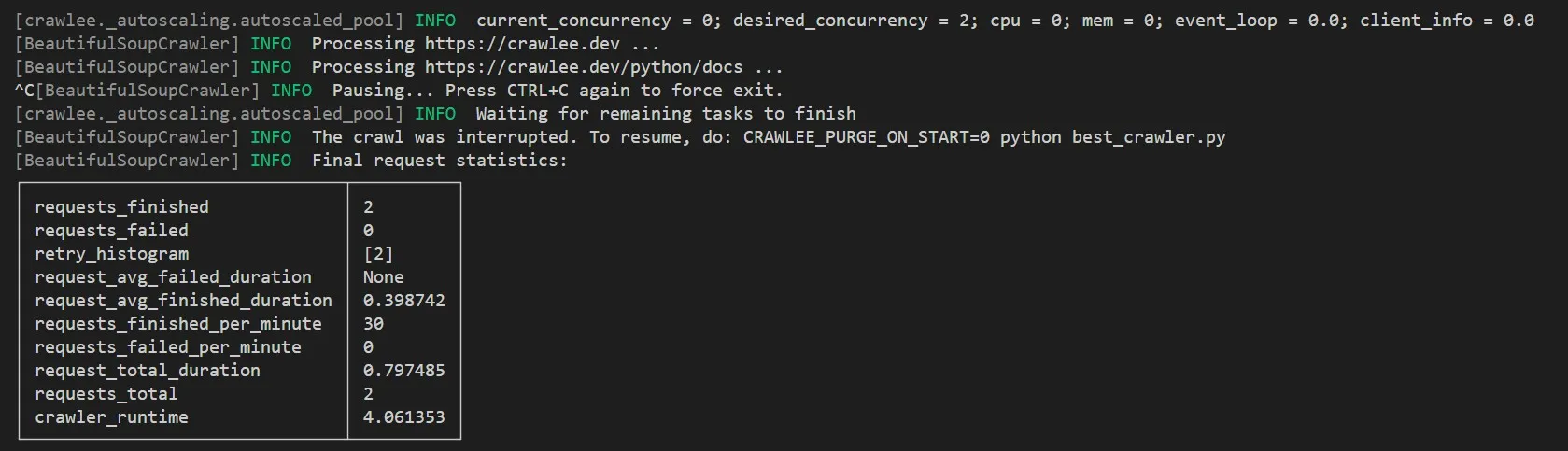
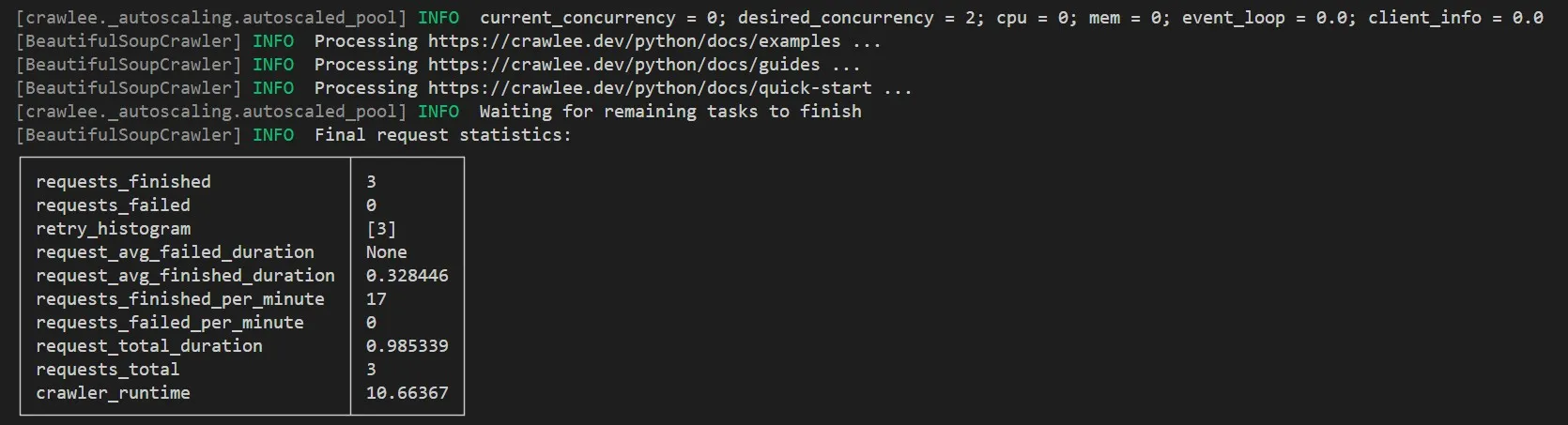
Use the following code and perform two sequential runs. During the first run, stop the crawler by pressing CTRL+C, and the second run will resume crawling from where it stopped.
import asyncio

from crawlee import ConcurrencySettings, service_locator
from crawlee.crawlers import (
    BeautifulSoupCrawler,
    BeautifulSoupCrawlingContext,
)

# Disable clearing the `RequestQueue`, `KeyValueStore` and `Dataset` on each run.
# This makes the scraper continue from where it left off in the previous run.
# The recommended way to achieve this behavior is setting the environment variable
# `CRAWLEE_PURGE_ON_START=0`
configuration = service_locator.get_configuration()
configuration.purge_on_start = False


async def main() -> None:
    crawler = BeautifulSoupCrawler(
        # Let's slow down the crawler for a demonstration
        concurrency_settings=ConcurrencySettings(max_tasks_per_minute=20)
    )

    @crawler.router.default_handler
    async def request_handler(context: BeautifulSoupCrawlingContext) -> None:
        context.log.info(f'Processing {context.request.url} ...')

    # List of links for crawl
    requests = [
        'https://crawlee.dev',
        'https://crawlee.dev/python/docs',
        'https://crawlee.dev/python/docs/examples',
        'https://crawlee.dev/python/docs/guides',
        'https://crawlee.dev/python/docs/quick-start',
    ]

    await crawler.run(requests)


if __name__ == '__main__':
    asyncio.run(main())
Perform the first run, interrupting the crawler with CTRL+C after 2 links have been processed.
Now resume crawling after the pause to process the remaining 3 links.
Alternatively, set the environment variable CRAWLEE_PURGE_ON_START=0 instead of configuration.purge_on_start = False:
CRAWLEE_PURGE_ON_START=0 python your_crawler.py