Fill and submit web form
This example demonstrates how to fill and submit a web form using the HttpCrawler crawler. The same approach applies to any crawler that inherits from it, such as the BeautifulSoupCrawler or ParselCrawler. These two crawlers can also fill in the form automatically.
We are going to use the httpbin.org website to demonstrate how it works.
Investigate the form fields
First, we need to examine the form fields and the form's action URL. You can do this by opening the httpbin.org/forms/post page in a browser and inspecting the form fields.
In Chrome, right-click on the page and select "Inspect" or press Ctrl+Shift+I.
Use the element selector (Ctrl+Shift+C) to click on the form element you want to inspect.
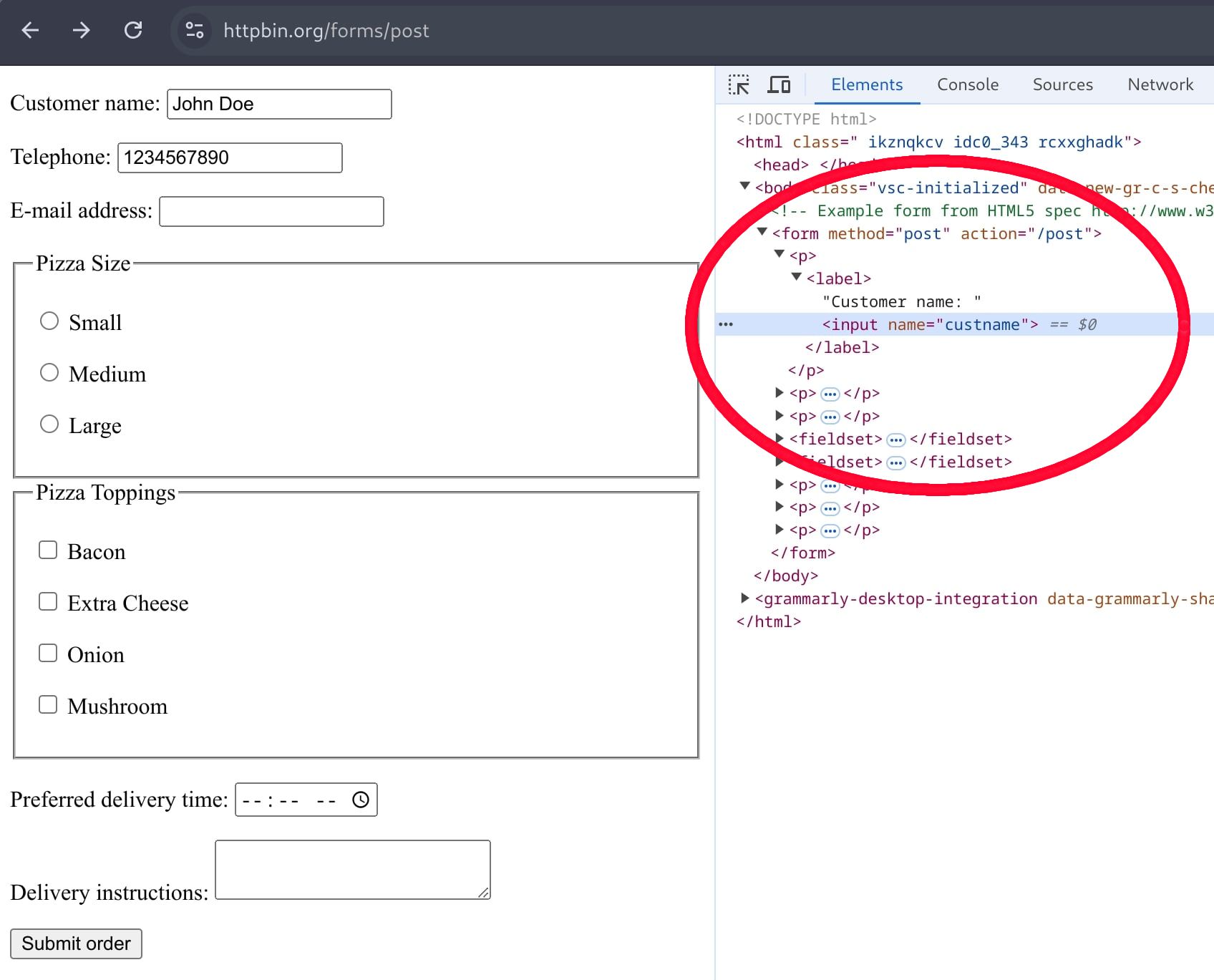
Identify the field names. For example, the customer name field is custname, the email field is custemail, and the phone field is custtel.
Now navigate to the "Network" tab in developer tools and submit the form by clicking the "Submit order" button.
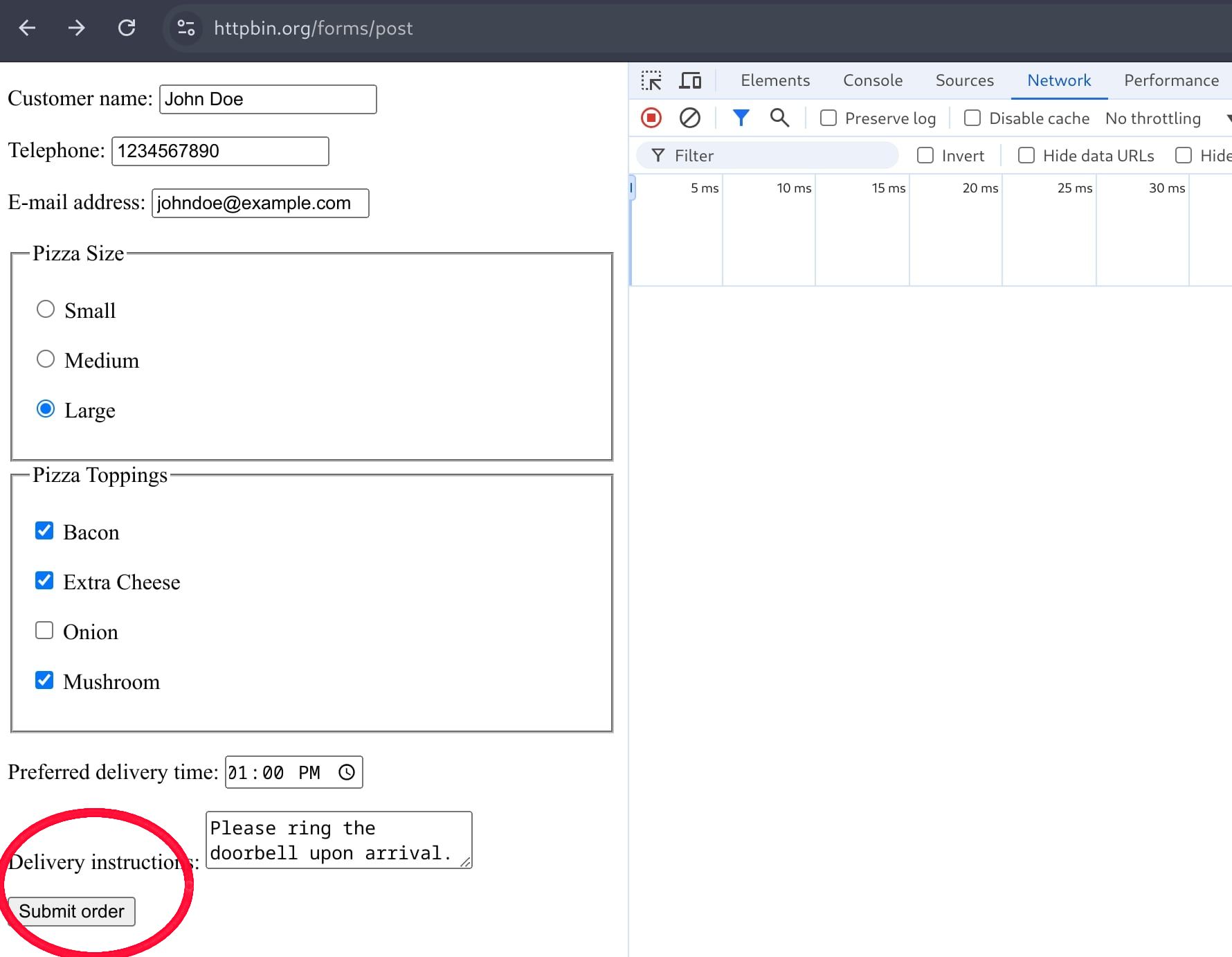
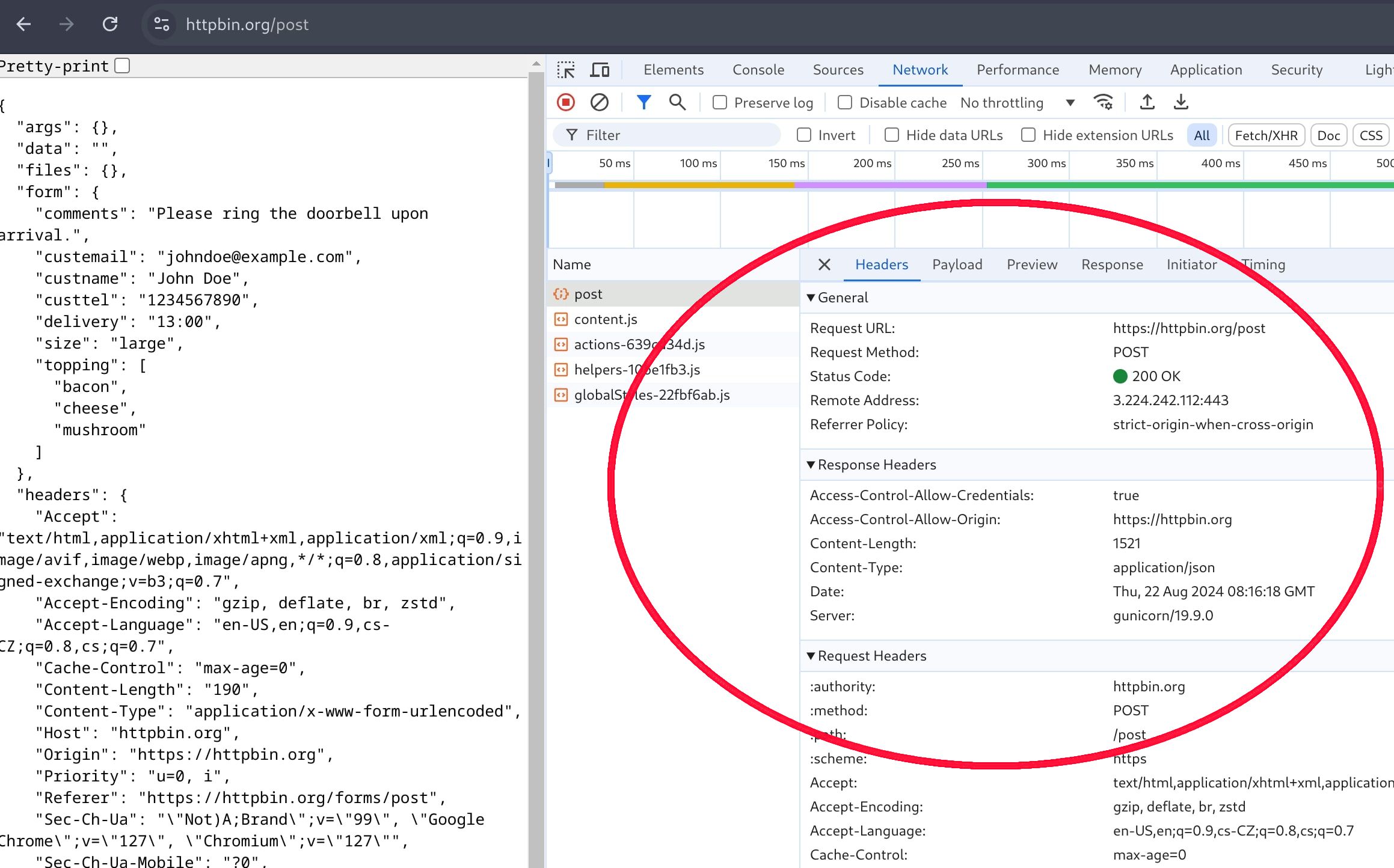
Find the form submission request and examine its details. The "Headers" tab will show the submission URL, in this case, it is https://httpbin.org/post.
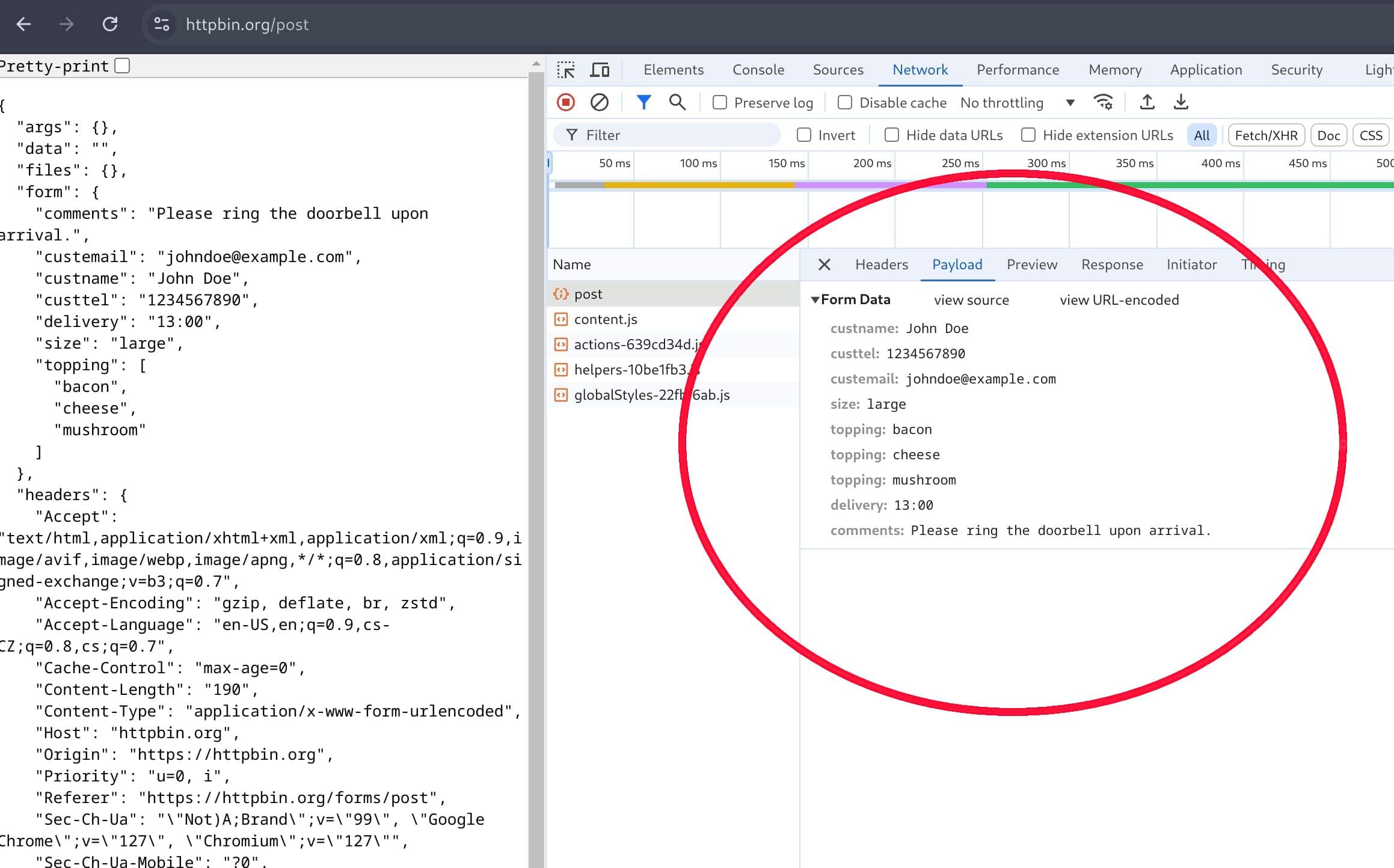
The "Payload" tab will display the form fields and their submitted values. This method could be an alternative to inspecting the HTML source code directly.
Preparing a POST request
Now, let's create a POST request with the form fields and their values using the Request class, specifically its Request.from_url constructor:
import asyncio
from urllib.parse import urlencode

from crawlee import Request


async def main() -> None:
    # Prepare a POST request to the form endpoint.
    request = Request.from_url(
        url='https://httpbin.org/post',
        method='POST',
        headers={'content-type': 'application/x-www-form-urlencoded'},
        payload=urlencode(
            {
                'custname': 'John Doe',
                'custtel': '1234567890',
                'custemail': 'johndoe@example.com',
                'size': 'large',
                'topping': ['bacon', 'cheese', 'mushroom'],
                'delivery': '13:00',
                'comments': 'Please ring the doorbell upon arrival.',
            },
            # Send `topping` as repeated fields instead of a single stringified list.
            doseq=True,
        ).encode(),
    )


if __name__ == '__main__':
    asyncio.run(main())
Alternatively, you can send form data as URL parameters using the url argument. It depends on the form and how it is implemented. However, sending the data as a POST request body using the payload is generally a better approach.
Implementing the crawler
Finally, let's implement the crawler and run it with the prepared request. Although we are using the HttpCrawler, the process is the same for any crawler that inherits from it.
import asyncio
from urllib.parse import urlencode

from crawlee import Request
from crawlee.crawlers import HttpCrawler, HttpCrawlingContext


async def main() -> None:
    crawler = HttpCrawler()

    # Define the default request handler, which will be called for every request.
    @crawler.router.default_handler
    async def request_handler(context: HttpCrawlingContext) -> None:
        context.log.info(f'Processing {context.request.url} ...')
        response = (await context.http_response.read()).decode('utf-8')
        context.log.info(f'Response: {response}')  # To see the response in the logs.

    # Prepare a POST request to the form endpoint.
    request = Request.from_url(
        url='https://httpbin.org/post',
        method='POST',
        headers={'content-type': 'application/x-www-form-urlencoded'},
        payload=urlencode(
            {
                'custname': 'John Doe',
                'custtel': '1234567890',
                'custemail': 'johndoe@example.com',
                'size': 'large',
                'topping': ['bacon', 'cheese', 'mushroom'],
                'delivery': '13:00',
                'comments': 'Please ring the doorbell upon arrival.',
            },
            # Send `topping` as repeated fields instead of a single stringified list.
            doseq=True,
        ).encode(),
    )

    # Run the crawler with the initial list of requests.
    await crawler.run([request])


if __name__ == '__main__':
    asyncio.run(main())
Running the crawler
Finally, run your crawler. Your logs should show something like this:
...
[HttpCrawler] INFO  Processing https://httpbin.org/post ...
[HttpCrawler] INFO  Response: {
  "args": {},
  "data": "",
  "files": {},
  "form": {
    "comments": "Please ring the doorbell upon arrival.",
    "custemail": "johndoe@example.com",
    "custname": "John Doe",
    "custtel": "1234567890",
    "delivery": "13:00",
    "size": "large",
    "topping": [
      "bacon",
      "cheese",
      "mushroom"
    ]
  },
  "headers": {
    "Accept": "text/html,application/xhtml+xml,application/xml;q=0.9,image/avif,image/webp,image/png,image/svg+xml,*/*;q=0.8",
    "Accept-Encoding": "gzip, deflate, br, zstd",
    "Accept-Language": "en-US,en;q=0.5",
    "Content-Length": "190",
    "Content-Type": "application/x-www-form-urlencoded",
    "Host": "httpbin.org",
    "Priority": "u=0, i",
    "Sec-Fetch-Dest": "document",
    "Sec-Fetch-Mode": "navigate",
    "Sec-Fetch-Site": "none",
    "Sec-Fetch-User": "?1",
    "Upgrade-Insecure-Requests": "1",
    "User-Agent": "Mozilla/5.0 (X11; Linux x86_64; rv:128.0) Gecko/20100101 Firefox/128.0",
    "X-Amzn-Trace-Id": "Root=1-66c849d6-1ae432fb7b4156e6149ff37f"
  },
  "json": null,
  "origin": "78.80.81.196",
  "url": "https://httpbin.org/post"
}

[crawlee._autoscaling.autoscaled_pool] INFO  Waiting for remaining tasks to finish
[HttpCrawler] INFO  Final request statistics:
┌───────────────────────────────┬─────────┐
│ requests_finished             │ 1       │
│ requests_failed               │ 0       │
│ retry_histogram               │ [1]     │
│ request_avg_failed_duration   │ None    │
│ request_avg_finished_duration │ 467.4ms │
│ requests_finished_per_minute  │ 124     │
│ requests_failed_per_minute    │ 0       │
│ request_total_duration        │ 467.4ms │
│ requests_total                │ 1       │
│ crawler_runtime               │ 485.3ms │
└───────────────────────────────┴─────────┘
This log output confirms that the crawler successfully submitted the form and processed the response. Congratulations! You have successfully filled and submitted a web form using the HttpCrawler.
Fill in the form automatically
The ParselCrawler and BeautifulSoupCrawler can build the form request for you. Their crawling contexts provide the extract_form_requests helper, which reads the form from the page, fills in your values and returns a list with the request that submits it the way a browser does. The action URL, the method and the encoding come from the form itself, so you only need the field names from Investigate the form fields.
The crawler below opens the page with the form. The default handler fills in the form with the fields argument and enqueues the submission with a label. A separate handler for that label processes the response.
import asyncio

from crawlee.crawlers import ParselCrawler, ParselCrawlingContext


async def main() -> None:
    crawler = ParselCrawler()

    # Fill in the form on the page and enqueue its submission.
    @crawler.router.default_handler
    async def request_handler(context: ParselCrawlingContext) -> None:
        context.log.info(f'Filling in the form on {context.request.url} ...')
        requests = await context.extract_form_requests(
            fields={
                'custname': 'John Doe',
                'custtel': '1234567890',
                'custemail': 'johndoe@example.com',
                'size': 'large',
                'topping': ['bacon', 'cheese', 'mushroom'],
                'delivery': '13:00',
                'comments': 'Please ring the doorbell upon arrival.',
            },
            label='form-result',
        )
        await context.add_requests(requests)

    # Process the response to the form submission.
    @crawler.router.handler('form-result')
    async def form_result_handler(context: ParselCrawlingContext) -> None:
        context.log.info(f'Processing {context.request.url} ...')
        response = (await context.http_response.read()).decode('utf-8')
        context.log.info(f'Response: {response}')  # To see the response in the logs.

    # Run the crawler with the page containing the form.
    await crawler.run(['https://httpbin.org/forms/post'])


if __name__ == '__main__':
    asyncio.run(main())
Note that:
fieldsreplaces the values of the listed fields and adds the ones the form doesn't have. A list submits the field once per value, as with thetoppingcheckboxes.- Fields you don't list keep the values from the page, so hidden inputs such as CSRF tokens are submitted as they are. A CSRF token is tied to the session cookie, so pass
session_id=context.session.idto send the form in the same session. The request also carries theRefererandOriginheaders a browser sends, which some CSRF checks require. - On a page with several forms, the helper submits the one sharing the most field names with
fields, or the first one if none shares any. It skips forms that can't be submitted, for example because their action is JavaScript, but never falls back to a form sharing fewer names, so the list can be empty. To pick a form yourself, pass a CSS selector such asselector='#order'. To submit each form, passall_forms=True. Thenfieldsonly replaces the fields each form has. - The first enabled submit button of the form is clicked by default, and a form without one is submitted anyway. Use the
clickargument to pick another button by its attributes, even a disabled one, or to submit without one. - The page decides where its form is sent. To enqueue only requests to the same host, call
context.add_requests(requests, strategy='same-hostname').